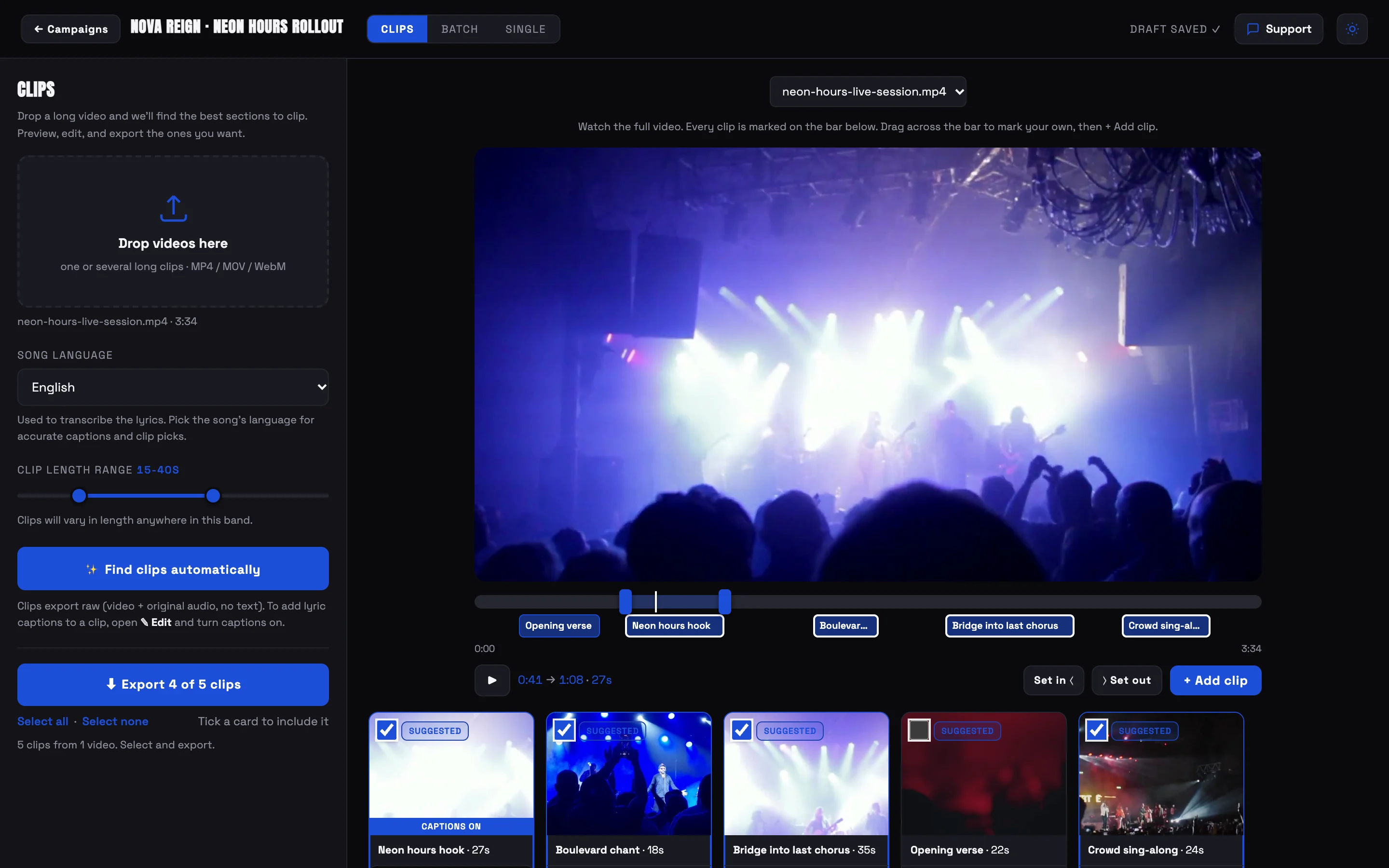
Clips that hitThe strongest moments of every song, episode or interview, cut and captioned for vertical.Podcast clipsAn hour-long episode in, a week of clips out, captioned word for word.Quote videos in batchesA topic in, a week of finished posts out.Captions in 10 languagesTranslate any caption and it stays in sync.
Made for more than music.
If it has people talking, singing or performing, Video Engine finds the moments worth posting.
Music & live setsFind the hooks in a performance or music video and caption the lyrics as they're sung.
PodcastsDrop in a full episode and pull out the moments worth sharing, captioned word for word.
Interviews & pressTurn an hour-long interview into short clips of the best answers. Follow person keeps the speaker in frame.
Talks, streams & behind the scenesKeynotes, livestreams and studio footage, turned into vertical posts for every day of the week.
How people use Video Engine.
Four real setups, from the video they start with to the posts that go out.
The producer
Streams beat-making live on Twitch or Kick.
Drops in the stream recording
Split Screen puts the face cam on top and the screen below, with "Cooking up a beat" on the line
Posts it to TikTok, Reels and Shorts in one go
Split Screen
Post
The artist with a new single
Has a music video and two weeks of promo to fill.
Drops in the music video
Clips finds the five strongest hooks with the lyrics captioned word by word, and Batch makes 12 quote videos from the lyrics
Schedules one a day on YouTube for two weeks
Clips
Batch
Schedule
The podcast
Records an hour every week and needs clips by Friday.
Drops in the full episode
Gets eight clips of the best answers, the speaker kept in frame, captions also in Spanish
Saves them to the show's Google Drive folder for the editor
Clips
10 languages
Google Drive
The label or manager
Runs content for a whole roster.
Gives each artist a project and each release a campaign
Builds a batch for every artist each week and posts to each artist's own accounts
Sees what's going out across the roster on one calendar
Projects
Batch
Calendar
Built for posting every day.
Pick up where you left offReopen a campaign, add the video back, and every clip, caption and crop is still there.
One ZIP, every clipSelect the clips you want and download them together, sorted into a folder per video.
A week of posts at onceBuild a whole set of quote videos together, tweak the words, and export them in one run.
Every project organizedProjects and campaigns keep each artist, show or release separate, on any computer you sign in on.
Post straight to your accounts.
Make it, then send it where it goes, without downloading a thing.
YouTube
Instagram
TikTok
Google Drive
Connect every accountLink your YouTube channels and your Instagram and TikTok accounts, as many as you manage.
Post or schedule in one clickSend a finished video to one account or several at once, or schedule a week of YouTube Shorts in one go.
Saved to Google DriveEvery export can go straight into a Drive folder for each campaign, ready to share with your team.
See what's going outA weekly calendar and your posting history show what's scheduled and what's live, account by account.
Posting to YouTube, Instagram and TikTok is rolling out as each platform finishes reviewing Video Engine.
A month on Video Engine
1,000
vertical videos
500500 clips from your videos100 uploads, 5 clips each
300300 quote videos25 batches of 12
200200 translated versions200 captions translated into another language
Clips from your videos500
Quote videos300
Translated versions200
About 33videos a day
About 3¢per video
Enough for artist accounts, podcast and show pages, fan pages and label channels, on TikTok, Reels, Shorts, Stories and Spotlight.
An example month. Each month the plan includes 1,000 video exports, 300 clip searches, 50 quote batches, 1,500 stock backgrounds, 300 caption translations and about 20 hours of transcription for captions.
Get 10% off your first 3 months.
Add your email and we'll send you a code to use when you start your plan.
We'll email your code and the occasional update. Unsubscribe anytime. See our Privacy Policy.
$29/month
Less than $1 a day.
About 3¢ a video.
1,000 videos a month. Enough to post every day on every account.
Every feature included. Clips, batches, framing, 10 languages, posting and Google Drive.
Your work, saved. Clips, captions and campaigns pick up where you left off.